
Muro Box-N20 Standard
Music Box Product Tutorial
目錄
1. Offline Playlist
After you insert the power cable into the N20 music box’s “15V 3A” slot, you can hear the music box start to play a short default melody (do mi sol si do), which means your music box is ready to play music.
Next, push the knob on the back side of the Muro Box-N20, and it will start to play your customized melody or the default playlist (30 songs in our Muro Box-N20 Official Playlist). If you wish to adjust the sequence of these melodies, simply drag and place the melody in the offline playlist via our app after you completed the connection setting between the Muro Box-20 music box and the Muro Box app on your phone.
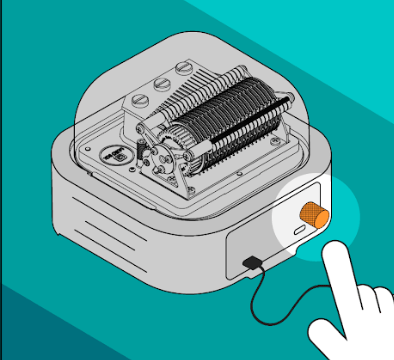
- How to Use the Knob:
- Press once: Play/Pause
- Turn right: Next song
- Turn left: Previous song
- We recommend that the music box be played continuously for a maximum of 2 hours, then allowed to rest and cool down for 30 minutes before resuming. Proper rest periods help prevent shortening of component lifespan.
- If condensation appears inside the lid after long periods of playing, do not worry. Simply turn off the power and let it sit until the mist dissipates, then you can continue using it. All internal components are coated with professional anti-rust oil that is heat-resistant.
- Do not open the lid and apply other lubricants yourself, as this may damage the original protective coating.
- If you have a need for long-duration playback, we recommend setting the playlist to scheduled playback. Please ensure that there is at least a 30-minute interval between the start times of each playlist to protect the hardware components from wearing out too quickly. You are welcome to check the instructions for setting up scheduled playlist playback.
2. APP Functions
Download our free app from the App Store or Google by searching “Muro Box”.
Pair the APP and the N20 Music Box for the first time:
- After you login to the Muro Box APP, click on the gear icon to go to the settings page.
- Accept to receive firmware update notification, click on the button “Muro Box Connection Setting”.
- Follow the app’s 4-step instructions to complete the WIFI connection setting. You can watch the following tutorials:
For iOS phone users: https://murobox.com/en/faq/app-tutorial-02c/
For Android phone users: https://murobox.com/en/faq/app-tutorial-02d/
Troubleshooting
Open our app, go to the settings page, click “Support” and then fill out the troubleshooting survey.
Our customer support staff will forward your report in one day to ask our engineering team to answer it during our office hours in Taiwan.
When you send the troubleshooting request via our app, it will record your phone’s version, app version, and product serial number automatically to help our engineer team debug.

3. How to search melodies in the app?
You can try various keywords to see if someone has already created the music box version of your favorite singer’s song, a movie theme song, a video game theme song, etc. You can even try keywords like Disney, and Ghibli Studio as the keywords to identify their famous melodies arranged by our global customers!

If you prefer not to see song titles in the app automatically translated
into your phone’s language, and want to keep them displayed in the original language uploaded (e.g., Chinese/Japanese/Korean/German), please follow these steps to turn off auto-translation:
- Tap your profile avatar
- Select “Translation”
- Switch off the “Auto Translation” toggle (default is ON)
If the search results are not many, you can also try to explore more melodies from the world’s largest online music box community: Music Box Maniacs (MBM). Please view this tutorial:
- If the above methods do not help you find a satisfactory music file, you may consider purchasing our customized arrangement service.
4. Compose Music via Muro Box App
All of the Muro Box products have the same app functions, including composing music directly on our app. Just a few clicks on the app, you can enter notes directly to complete your music creation and the Muro Box music box will become your exclusive pianist!
Essential Guide to Music Box Arrangement:
- File Format Limitation:
Muro Box can only read single-track MIDI files and does not support other formats. - Note Range Limitation:
- N20 Range: C3 to A5 (white keys only, excluding black keys).
- N40 Range: F2 to A6, excluding F#2, G#2, A#2, and C#3.
(Middle C = C3, 261.6 Hz). Before using arrangement software, ensure that the middle C in the software is set to C3 or C4 to avoid playback errors in the music box’s note range.
- Playback Speed Limitation:
At a tempo of BPM = 120, the shortest continuous note unit is an eighth note. This means that at this speed, the fastest continuous single notes can play at 120 notes per minute.
Maximum Simultaneous Notes: 10 (up to 10 notes can be played simultaneously).
For recommended music box arrangement tools and external MIDI keyboards, click here to learn more. We also invite you to read the article “How to Bring Your Arrangement Creativity to Life with a Music Box” for more tips and techniques on arranging music for the Muro Box.

5. Connect with Other MIDI Device
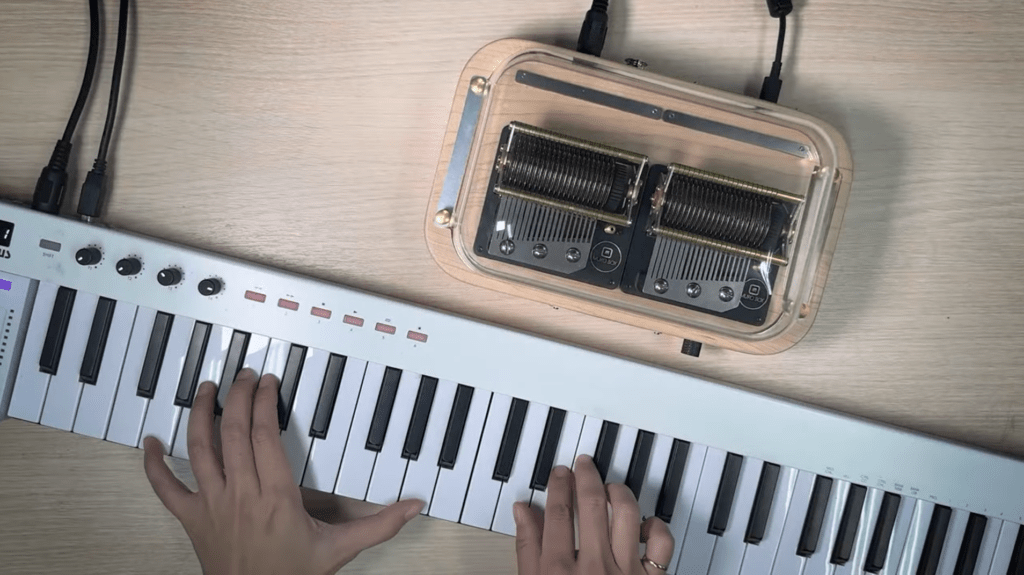
The following models have a MIDI input slot on the backside of the music box for you to connect it with a MIDI keyboard/ computer: N20 Standard, N40 Standard, and N40 Sublime. Please read the following tutorial to connect your MIDI device with the music box!
6. More Features Await You!
For a detailed introduction to Muro Box’s features, please refer to our FAQ’s first question: “How to Use Muro Box”.
Clicking it will provide detailed blog explanations for each feature setting.
【Welcome to Join Our Global User Community!】

This is an international group for discussing how to use Muro Box and its app to create wonderful melodies for you and your loved one!
This group is only available for customers who have already purchased Muro Box.
Please carefully answer the 3 questions when joining the group:
- Have you liked the Muro Box Global Fan page already? If not, please go give it a like!
- Have you purchased a Muro Box already? Yes/No
- Please indicate your customer Name and the Email you provided to Muro Box.
【What Will We Share in this Group?】
- Tutorial Videos and Handouts
- App-related announcements: problem-shooting, version updates, new features survey
- Melodies and Composers we recommend
- Melody Composing Requests and Contests