
When the Music Box Meets Analog Synthesizer: Bringing Real Time-Strike Action into the MIDI World!
Muro Box Arranger: Hung-Yin Liu
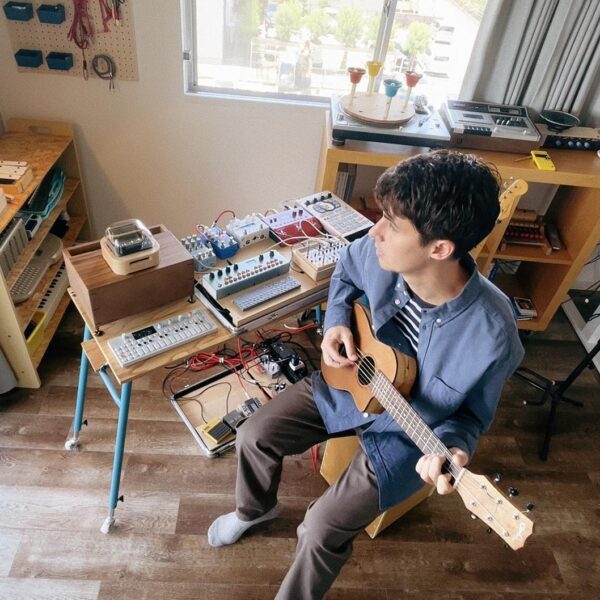
When the Music Box Meets Analog Synths: Bringing Real Tine-Strike Action into the MIDI World!
Muro Box Arranger: Hong-Yin Liu
Are you a DJ or a gear-obsessed synth head, always hunting for that elusive “organic noise” and “groovy texture” with a life of its own—something digital just can’t quite replicate—somewhere between the knobs and circuitry of your synths?
Imagine being able to play the Muro Box smart music box in real time, just like a piano, using only a MIDI keyboard or synth. You can even run it through various MIDI effects to coax out unexpected, surprising melodies and textures.
This isn’t just playing—it’s a fascinating interplay between digital commands and a physical mechanism. Let’s dive straight into our hands-on tests pairing the Muro Box with a selection of classic synthesizers.
When Digital Commands Meet the Smart Music Box
So, how does the Muro Box bridge the digital and mechanical worlds to enable track changes and real-time performance? The secret is its patented, world-first note cylinder.
This tech completely breaks the limitations of a traditional music box’s fixed cylinder by combining electromagnets with a mechanical assembly. When the music box receives a MIDI signal, the internal coils energize to engage specific pin plates with the main axle, which then rotates to strike the tine comb and produce sound. Every key you press sends a signal that tells the corresponding mechanical cylinder to rotate and strike.
It’s like giving a traditional music box a digital nervous system, turning what was once a wind-up device that could only play pre-programmed tunes into a “physical instrument” you can control on the fly.
– The Muro Box only reads MIDI “Note” pitch and “Timing.” It ignores Velocity and note sustain parameters entirely. Instead, it relies purely on the fixed physical force of its mechanism to strike the tine comb, delivering a crisp, staccato, purely acoustic vibration.
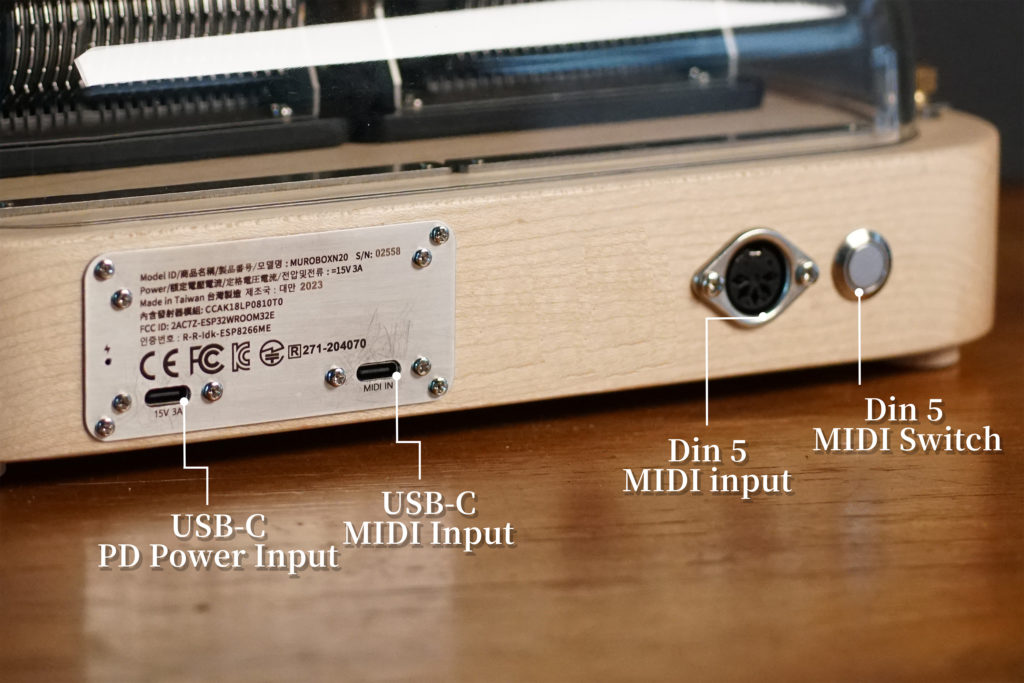
– **The N40 Sublime, N40 Standard, and N20 Standard all come with MIDI IN functionality, letting you hook them up to external gear and DAWs.**
Creating Unique Sounds: Connecting Music Box and Synthesizer
In the video above, you’ll see a bunch of musicians connecting various MIDI controllers and synths to the Muro Box, using them to craft uniquely atmospheric sounds. There’s something incredibly satisfying about watching that real tine comb get struck in real time. This kind of hands‑on, hardware‑to‑hardware feedback not only gives the sound genuine, organic life but also throws up happy accidents and unexpected melodic ideas as you tweak parameters on the fly.
Here’s the current Muro Box lineup and their MIDI IN connectivity:
– N40 MuFeng / N40 Standard: Equipped with both Type‑C and 5‑pin DIN MIDI In ports
– N20 Standard: Equipped with a modern, streamlined Type‑C port
This makes the Muro Box a breeze to connect to your existing MIDI controllers or synths. Think of it as a powerful “acoustic oscillator” for your rig. You can drive it with your favorite sequencers and other MIDI FX, using digital control to generate the most authentic, beautifully physical percussive sounds.

Below is a rundown of the various experiments Shawn, an American musician based in Japan, ran with our N40 and his existing MIDI controllers and synths. We’ve listed the projects he performed with timestamps from the video for your reference, along with a written summary of his commentary:
Use the table of contents to jump to the effect description sections for each device.
Arturia Keystep 37

First up in the video is the Keystep 37. Its MIDI capabilities are way more extensive than its compact size might suggest.
– **Arpeggiator 0:46**
Flip on ARP mode, hold down a chord, and the Keystep will automatically spit out the notes of that chord one by one. Each MIDI signal sent to the Muro Box translates into an actual, physical strike.
– **Chord Mode 1:20**
Hold down Shift + Hold to engage Chord Mode. In the video, Shawn tests with a Cmaj7 chord. Once it’s set up, playing any root note makes the Keystep automatically fill in the corresponding chord tones. Hit a single C, and out comes a Cmaj7; move to G, and you get a Gmaj7.
– **Strum Function 2:02**
This feature sends out the notes of a chord sequentially rather than simultaneously, emulating the feel of a strummed guitar. You can dial in the direction—low to high, or high to low—and tweak the rate to control the strumming speed.
– **Sequencer 13:45**
Shawn pulls up the Sequencer function toward the end of the video. After pre‑recording a note sequence, simply changing the note you play on the keyboard makes the device automatically transpose the sequence in real time, using that new note as the root. He uses this sequence as an auto‑accompaniment, shifting the keyboard range up to improvise a melody on top—a neat little one‑man‑band performance.
(2) Teenage Engineering OP-1 Field

The OP‑1 Field connects straight to the Muro Box via USB‑C—no MIDI interface or adapter needed. Just plug and play.
– **Pattern Sequencer Mode (3:02)**
Select Pattern mode (a grid‑based step sequencer), input a melody, then hit start with the knob and dial in the playback speed. Within these repeating loops, Shawn gradually layers in additional notes. As the density builds, an unexpected, flowing feel emerges—Shawn notes that it reminds him of the light, organic flow of Japanese ambient pioneer Hiroshi Yoshimura’s classic, “Soft Wave for Automatic Music Box.”
– **Hold Mode + Encoder Control (3:53)**
In Hold mode, you can preselect a set of notes to keep them “held” (or queued up), then use the knob to manually and in real time trigger each note—like cranking a traditional music box by hand.
– **Arpeggiator Mode (4:13)**
In Arp mode, press a chord and use the knob to make the Muro Box play the arpeggio upward, downward, or in a random order.
– **Endless Sequencer Mode (4:39)**
You can input your own note sequence. Once the OP‑1 has locked in the length and pattern, simply pressing any note on the keyboard will use that note as the reference to perfectly replicate the scale sequence you just entered—with support for reverse, random, and other manipulations.
– **Tombola Physical Modeling Sequencer (5:20)**
Tombola is a physical modeling sequencer on the OP‑1: the screen shows a rotating octagonal container. Each time you press a note, a ball drops in. Whenever a ball hits the wall of the container, it triggers a MIDI note.
The more balls, the denser the hits—and the music box’s tine strikes accelerate accordingly. Shawn’s take: “It sounds a little crazy, like some of the music I was making in the early 2000s.” What surprised him was that the Muro Box’s mechanical response kept up perfectly with this kind of high‑frequency, high‑density extreme triggering.
(3) Suzuki Omnichord OM-108—Slide Instead of Press

The Omnichord is a classic electronic instrument from 1981 (reissued in 2024 as the OM‑108). It features a unique strum pad on its body—just slide your finger across it to play chords. (At 7:02 in the video)
– The Muro Box listens for MIDI on Channel 1 by default, and the Omnichord’s default Channel 1 output just happens to be the Strum Pad.
– In the video, Shawn kills the Omnichord’s internal sound entirely (Volume down), so all notes are generated solely by the Muro Box. The speed and range of his finger sliding across the touchpad directly translate into the trigger density of the music box’s mechanics. It’s a direct translation of a physical hand motion across a tangible surface into the mechanical plucking of the music box—an incredibly tactile, human‑machine integrated feel.
(4) Korg Minilogue—Analog Tone and Mechanical Resonance Together

In the previous tests, the Muro Box was the sole sound source. This one takes a different approach: letting the Minilogue’s synth tones and the Muro Box’s mechanical plucking ring out together.
– The Minilogue is a 4‑voice analog synth with that warm, slightly gritty analog edge to its tone; the Muro Box’s tine strikes, by contrast, are clean and crisp. The two complement each other beautifully in terms of timbre.
– Shawn records an arpeggio sequence in real time and uses the Minilogue to shift the octave up, letting the synth’s rich, thick tones serve as the foundation while the Muro Box chips in with the higher‑end strikes, creating a clear sense of layered texture.
(5) Teenage Engineering OP-Z

The OP‑Z is Teenage Engineering’s portable sequencer—small in size, but absolutely packed with features. (At 9:30 in the video)
- Shawn starts off in Pattern mode, getting the OP‑Z to memorize the notes and their positions he inputs, turning them into a repeating loop. The off‑beat notes create a sense of randomness, sounding like a non‑quantized melody—something you don’t often hear from a music box. It doesn’t sound like a melody you’d logically sit down and write; instead, it throws up surprises and happy accidents.
- Next, he leverages the OP‑Z’s “Master track chord transposition” function for real‑time key changes. As he tweaks it, the sequencer automatically analyzes and makes the other tracks “adapt” to the current key and scale, resulting in melodic directions that the creator probably wouldn’t have written intentionally. Shawn’s take: “These melodies feel like a product of technology and real‑world sound coming together, flowing out naturally.”
(6) Other: Resonance Box Effect / N40 and N20 Exterior Comparison

Later in the video:
– Performance with a resonance box (at 12:01)
– Unboxing the N40 and comparing its exterior and MIDI ports with the N20 (at 12:35)
If you’re interested, be sure to check out the full video!
If you’re curious about how Shawn discovered the Muro Box and his recording/miking techniques, head over to his user story.
Using various MIDI effects in arrangement software
When you’re working in a DAW, the built‑in MIDI effects offer the same capabilities as the hardware synths we just covered—arpeggiators, chord generators, you name it. After watching all these synth demos, I’m convinced that using these randomly generated mechanical sounds as part of your creative process is a fantastic idea! If you haven’t tried it yet, I highly recommend giving these features a spin. The music box’s sound is inherently soothing, and running these tests can easily immerse you in a fantastical atmosphere without you even realizing it.
I used Logic Pro to test out a few MIDI effects. In the track Inspector on the left, locate the MIDI FX section. Click on it, and a drop‑down menu appears. I picked three to test: Arpeggiator, Chord Trigger, and Note Repeater.

Note: In the following recordings, I removed the top cover to avoid glare (only the N40 lets you pop the cover off yourself), so the mechanical sounds in the recording come through more clearly. I also used some noise reduction software to tame the motor noise and room ambience.
(1) Logic Pro - Arpeggiator
Just hold down a chord, and the software will automatically walk through the notes, weaving a continuously looping melodic line.
In the video, I only tried “Up” and “Up & Down”—feel free to explore the other modes yourself. One thing to watch out for: in “Up & Down” or “Random” modes, if the same note gets triggered too frequently, the music box’s physical limitations may cause it to miss a few strikes. But hey, that can also be a happy little “surprise.”
(2) Chord Trigger
The Chord Trigger lets you play a whole chord with just one key! Set your interval parameters, and with a single finger press on a note, the software will automatically trigger an entire chord that fits the interval.
- Keyboard Split Function (0:32)
Chord Trigger also supports keyboard splitting! You can divide your keyboard into two zones: set the left‑hand zone as the chord trigger area—press a single key, and the Muro Box strums the chord—while the right‑hand zone stays as a free‑play area for you to riff on melodies.
(3) Note Repeater
The Note Repeater has a few key parameters: besides Delay Time, which sets the interval between notes, the most important ones are Repeats, which sets the number of repetitions, and Transpose, which determines how many semitones each repetition shifts up or down.
As mentioned earlier, while you can tweak Velocity decay on the interface, the Muro Box itself doesn’t read velocity at all.
When these high‑density repeated notes are layered and mixed with the same force inside the resonance box, the resulting dissonant mechanical tine tones take on an eerie, unsettling quality—perfect for horror or thriller soundtracks!
Conclusion
What makes the Muro Box so compelling is that it doesn’t just turn digital data into physical sound—it’s also a player piano of sorts, ready to perform for you at any moment. As an automatically playing instrument, considering its price point and footprint, the Muro Box is an accessible, real‑time interactive “genuine mechanical instrument.”
Whether you’re looking to experiment with avant‑garde ambient soundscapes or inject some real metallic percussive life into your tracks, it’s already waiting on your workbench, ready to respond to your MIDI commands with the purest physical motion!
We’ll be continuing this series with more ways to play the Muro Box—both standalone and via DAW software—so stay tuned! If there’s a specific piece of gear you’d like to see paired up, or if you want us to test some wild MIDI experiment, feel free to drop us a line at support@tevofy.com.
Notes
Physical Limits of Music Box Performance
The Muro Box completely breaks through the limitations of traditional music boxes, allowing for performances of unlimited length. However, as a real mechanical device, it still operates within the unique constraints of the physical world. Understanding these limits won’t just help you tighten up your arrangements—it’ll also let you fully leverage the unique mechanical beauty of an analog instrument.
1. Range Limitation
With Middle C = C3 = 261.6 Hz as the reference:
- N40 (40 notes): Range is F2 to C6, excluding F#2, G#2, A#2, and C#3.

- N20 (20 notes): Range is C3 to A5, excluding black keys.

- Notes played above the highest or below the lowest note will produce no sound.
- If you play a semitone that doesn’t exist in the scale, the Muro Box will automatically pitch it up by a half‑step.
2. Mechanical Latency: Feeling the Pulse of Physical Motion
There’s roughly 0.1 seconds (100ms) of latency from when the Muro Box receives a MIDI signal to when it actually strikes and produces sound.
3. Melodic Performance—For "Different Notes"
If the melody consists of moving, non‑repeating notes, the Muro Box’s playing speed has virtually no upper limit.
– Response Time: Processing different notes takes only 0.001 seconds.
– Real‑World Proof: Even at a blistering ♩ = 375 BPM cranking out 1/64th notes (the smallest unit in the App), the Muro Box keeps up without breaking a sweat.
– Musical Expression: You can freely write dense chromatic runs like “Flight of the Bumblebee” without worrying about dropped notes.
4. Melodic Performance—For the "Same Note"
Same‑Note Repeat Limit (for the “same note”): Due to the physical rebound time required by the mechanical plucking mechanism, the same note can’t be struck more than five times per second—that’s a max of 300 continuous strikes per minute.
- Quick Check: When you’re at ♩ ≥ 75 BPM and continuously playing 16th notes on the same note, you might start dropping hits.
- Optimization Tip: If that happens, try deleting one of the repeated notes.
5. The Muro Box Ignores MIDI Velocity
The Muro Box only reads MIDI “Note” pitch and “Timing.” It completely ignores Velocity and note sustain. No matter how hard or soft you hit the keys in your software or on your keyboard, or how long you hold a note, it will always rely purely on the fixed force of its physical mechanism to strike the tine comb, delivering a crisp, staccato, purely acoustic thwack.